

Five smart refrigerator features consistently earn their keep: inventory cameras, remote temperature control with alerts, energy scheduling, predictive diagnostics, and Matter/Thread interoperability. Everything else is largely showroom polish. These fridges cost more upfront, draw a little extra power for cameras and displays, and raise real privacy questions worth checking before you buy. Kitchendevotion has spent years comparing kitchen appliances against real household habits, not spec sheets, and that’s the lens this guide uses.
- Inventory cameras cut duplicate purchases, but only if you check the app before shopping
- Remote alerts protect food during power outages and vacations
- Energy scheduling and ENERGY STAR ratings matter more than screen size
- Predictive diagnostics catch failures before they ruin your groceries
- Matter/Thread certification future-proofs your smart home setup better than any single-brand voice assistant
Key Takeaways
Smart refrigerator features deliver real value only when they match how you actually cook, shop, and manage a smart home, not the fullest spec sheet available.
| Point | Details |
|---|---|
| Cameras need habit | Inventory cameras cut duplicate purchases only if you check the app before shopping, not after. |
| Alerts should give instructions | The best door and temperature alerts tell you what to do next, not just that something went wrong. |
| Efficiency beats screen size | Compare normalized kWh per cubic foot and check for ENERGY STAR before assuming a display raises your bill. |
| Diagnostics cut downtime | Sensor-based predictive maintenance shifts service visits from guesswork to targeted repairs. |
| Kitchendevotion prioritizes fit over features | Kitchendevotion’s appliance guides rank which smart features are worth the upgrade for your specific household. |
Table of Contents
- How Do Refrigerator Inventory Cameras Actually Work?
- What Do Remote Temperature Alerts Actually Protect Against?
- Do Smart Fridges Increase Your Energy Bill?
- How Accurate Are Predictive Maintenance Alerts?
- Are Touchscreens on Refrigerators Worth the Cold-Air Trade-Off?
- Do Grocery Sync and Recipe Suggestions Actually Save Time?
- What Privacy Questions Should You Ask Before Buying?
- What’s the Right Way to Choose a Smart Refrigerator?
- What Does the Research Actually Say About Smart Fridge Value?
- Who Should Actually Upgrade to a Smart Fridge?
- Find the Right Appliance Fit With Kitchen Devotion
- Sources
- FAQ
How Do Refrigerator Inventory Cameras Actually Work?
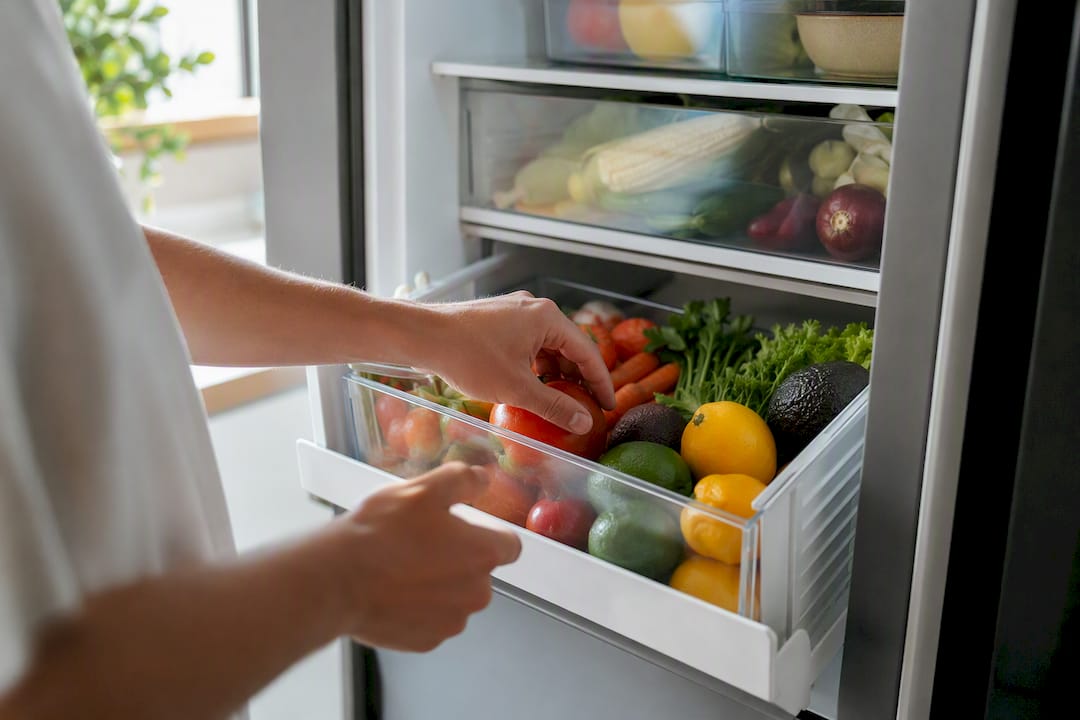
Most built-in cameras don’t stream live video. They snap a photo the moment the door closes, then upload it to the companion app. That single detail explains a lot of user complaints about “inaccurate” inventory: if you moved the milk after the last snapshot, the app doesn’t know.
The real payoff shows up in fewer duplicate purchases and smarter shopping lists, but the benefit depends entirely on habit. You have to open the app before you leave for the store, not after you’re already standing in the dairy aisle. Camera-based systems are marketed to cut household food waste by roughly 20 to 30 percent, largely by avoiding the “I think we’re out of eggs” guesswork that leads to a third grocery run.
- Built-in cameras need decent lighting and a wide field of view to catch items stacked behind each other
- Retrofit shelf cameras cost less but often lock recognition features behind a subscription
- Snapshot delay means the app reflects the last door close, not the current second
Pro Tip: Check the app the night before your grocery run, not the morning of. Snapshots taken after a busy dinner prep session are far more accurate than ones from three days ago.
What Do Remote Temperature Alerts Actually Protect Against?
Remote monitoring exists for one job: catching problems before your food spoils. Vacation mode lets you nudge the temperature up a degree or two while you’re away, and door-open or power-outage alerts push a notification the moment something goes wrong, not after you get home to a puddle.
The best alerts tell you what to do, not just that something happened. “Door open for 10 minutes” is useless without a next step; “door open, adjust or call for service” is not. Before buying, test the demo unit for these signals:
- How fast does the alert arrive after a triggering event (seconds versus minutes)?
- Does the fridge have local physical controls if the app or Wi-Fi fails?
- How often has the manufacturer pushed firmware updates in the past year?
Do Smart Fridges Increase Your Energy Bill?
Not necessarily. An always-on display and internal cameras draw a small amount of extra power, but that draw is usually offset by a more efficient compressor and smarter defrost cycling. Comparisons that normalize energy use by cubic foot show that screen size alone doesn’t predict higher energy costs once you account for capacity and platform generation.
Look for the ENERGY STAR label first, then check the estimated kWh per year on the yellow EnergyGuide sticker. Divide that number by the fridge’s cubic feet of capacity so you’re comparing apples to apples across different sizes.
Time-of-use scheduling, which shifts compressor cycles to off-peak electricity hours, is where real savings show up for households on tiered utility rates. Before you count on rebates, verify the fridge’s smart platform actually connects to your utility’s program. Some manufacturer promises require an API integration your utility hasn’t approved yet.
- Confirm ENERGY STAR certification, not just “energy efficient” marketing language
- Ask whether time-of-use scheduling requires a specific utility partnership
- Calculate kWh per year divided by cubic feet before comparing models
How Accurate Are Predictive Maintenance Alerts?
Smart diagnostics rely on sensors tracking compressor current, internal vibration, and temperature variance over time. When those readings drift from the normal pattern, the fridge’s cloud-connected system flags a likely fault before it becomes a full breakdown. This is meaningfully different from the old “it just stopped working” service call.
Research analyzing data from roughly 300,000 connected devices found predictive models can reach close to 90 percent precision in flagging impending fault scenarios. That precision converts a lot of service visits from generalized troubleshooting into targeted repairs, cutting downtime and the odds of a full week without a working fridge.
A technician arriving already knowing the compressor’s current draw has spiked is doing a fundamentally different job than one arriving to diagnose a mystery. That shift, from guesswork to targeted repair, is the real value of predictive diagnostics.
Before buying, confirm two things: does the extended warranty actually cover the electronics and sensors, and does the diagnostic alert give you an action step (schedule service, check the door seal) rather than just a vague warning light?
- Ask what sensors are included, not just “smart diagnostics” as a marketing term
- Confirm the warranty covers the electronic components, not just the compressor
- Check whether alerts include a clear next action or just a generic warning
Are Touchscreens on Refrigerators Worth the Cold-Air Trade-Off?
A door touchscreen can genuinely function as a family command center: shared calendars, recipe lookups, sticky notes that don’t fall off, and the occasional streaming video while you cook. Product testers note that larger screens see real daily use rather than sitting ignored, but every time someone opens that panel, cold air escapes. Knock-to-view panels solve this by keeping the screen dark and insulated until you tap the glass twice.
The bigger long-term question isn’t the screen at all. It’s whether the fridge speaks Matter or Thread, the interoperability standards that let devices from different brands talk to each other without a proprietary hub. A brand-locked voice assistant looks impressive in the showroom, but it strands you if you switch smart-home ecosystems later.
- Large touchscreens work well for households that actually use shared calendars and meal planning
- Knock-to-view panels cut the cold-air loss problem without sacrificing screen access
- Matter/Thread certification matters more long-term than any single-brand smart assistant
Pro Tip: Ask the retailer for the model’s Matter certification documentation, not just a “smart home compatible” sticker. Certification and vague compatibility claims are not the same thing.
Do Grocery Sync and Recipe Suggestions Actually Save Time?
Automated shopping lists that populate from your fridge’s inventory, recipe suggestions based on what’s about to expire, and family list sync across phones all sound great on the feature checklist, and for households that cook from scratch several nights a week, they genuinely cut waste and save planning time.
For occasional cooks, though, these features mostly go unused. If you eat out four nights a week, an AI recipe suggestion engine is a novelty you’ll open twice and forget. Review sentiment across smart fridge owners consistently flags app instability as a recurring complaint, so test the app yourself in-store rather than trusting the demo video.
- Confirm which recipe and grocery features are free versus locked behind a monthly subscription
- Ask if grocery delivery integrations connect to services you already use
- Test the companion app’s stability on your own phone before buying, not just the showroom tablet
What Privacy Questions Should You Ask Before Buying?
A refrigerator with an internal camera is a connected device on your home network, and that deserves the same scrutiny you’d give a smart doorbell.
- Ask whether the camera is opt-in by default, and whether photos stay on local storage or upload to the manufacturer’s cloud.
- Check the frequency of firmware updates. A device that hasn’t been patched in over a year is a security liability, not a convenience.
- Look for two-factor authentication on the companion app account and the option to put the fridge on a separate guest network, isolated from your laptops and files.
Pro Tip: Before you buy, ask the retailer directly: “Where is my kitchen photo data stored, and can I delete it?” A vague answer is itself useful information.
What’s the Right Way to Choose a Smart Refrigerator?
Start with the boring measurements: door swing clearance, depth against your counters, and whether the space has ventilation for the compressor. Set your budget around the specific features you’ll actually use, not the full feature stack a salesperson walks you through.
- Measure your space and confirm ventilation clearance before you fall in love with a model online.
- Decide your form factor: French door, side-by-side, or counter-depth, based on kitchen layout, not looks alone.
- Set a budget tied to the two or three features you’ll use weekly, not every feature on the spec sheet.
- Verify the app has decent reviews for stability, not just a high star rating from launch week.
- Confirm the warranty covers electronics and sensors, not only the compressor and refrigerant system.
- Check for Matter or Thread certification if you already run a smart-home ecosystem.
- Compare the normalized kWh-per-year figure against similarly sized ENERGY STAR models.
- Ask about utility rebate eligibility and whether the energy-scheduling feature needs a specific API partnership.
If you’re not ready for the full jump, retrofit sensor kits offer basic temperature logging and alerts at a fraction of the cost, without cameras or brand support.
| Buyer profile | What to prioritize |
|---|---|
| Camera first | Built-in wide-angle camera, app with clear expiry estimates, no subscription lock on recognition |
| Ecosystem first | Matter/Thread certification, documented third-party API access, minimal reliance on brand-specific voice assistant |
| Remote temp only | Reliable alert latency, local physical controls, strong warranty on sensors, skip the touchscreen upsell |
What Does the Research Actually Say About Smart Fridge Value?
The strongest evidence for smart fridges isn’t marketing copy. It’s food-waste data. Penn State’s research found American households discard nearly a third of the food they acquire, which is exactly the gap camera-based inventory systems target when they claim 20 to 30 percent waste reduction. That number only holds if you actually use the app.
On the maintenance side, the IEEE FiCloud research on IoT refrigerator diagnostics backs up the service-visit shift from generalized troubleshooting to targeted repair, which matters most for households that can’t afford a week without a working fridge.
Waste reduction and predictive repair aren’t showroom features. They’re the two places where the data actually supports the marketing claim, which is rarer than it should be in this category.
For model-specific detail, Kitchendevotion’s LG LFDS22520S review and broader smart kitchen guide cover how these features perform in real households, not just spec sheets.
Who Should Actually Upgrade to a Smart Fridge?
Large households, frequent scratch cooks, and anyone already running a Matter-based smart home get the clearest return here. Occasional cooks and single-person households usually get more value from a basic Wi-Fi model or a retrofit sensor kit than the full camera-and-touchscreen package.
Find the Right Appliance Fit With Kitchen Devotion
A smart fridge is one purchase in a much bigger kitchen upgrade decision, and figuring out which appliances actually deserve your budget is the harder problem most shoppers skip. Kitchendevotion built its Kitchen Appliance Priority List for New Homeowners specifically to solve that: it ranks which upgrades pay off first, with price ranges and honest pros and cons instead of vendor gloss.
If your main goal is saving time in the kitchen rather than chasing every smart feature, the Time-Saving Kitchen Appliances List for Busy Cooks narrows the field further. Start with the priority list, match it against your actual cooking habits, and you’ll walk into a showroom knowing exactly what to ask for.
Sources
- Study suggests U.S. households waste nearly a third of the food they acquire — Penn State
- AI based Diagnostic Service for IOT enabled Smart Refrigerators — IEEE FICLOUD 2021
- IoT Smart Refrigerators Guide: How to Choose Wisely in 2026 — Smart Freedom Todays
FAQ
Why Would Anyone Buy a Smart Fridge?
The practical reasons are food waste reduction through inventory tracking, remote alerts that catch problems while you’re away, and predictive diagnostics that catch failures before they cost you a fridge full of groceries.
What Can You Do With a Smart Refrigerator?
You can check what’s inside from your phone, adjust temperature remotely, get alerts for open doors or power outages, sync grocery lists across family members, and receive maintenance warnings before something breaks.

What Are the Advantages of a Smart Fridge?
The clearest advantages are measurable waste reduction from inventory cameras, food-safety protection through remote alerts, and lower repair costs from predictive diagnostics, though all three depend on you actually using the companion app.
Can You Watch TV on a Smart Fridge?
Some door touchscreens support streaming apps, but it’s a minor perk compared to the fridge’s core smart features, and it comes at the cost of cold-air loss every time the screen is active.
Are Smart Fridges Worth the Extra Cost?
They’re worth it for large households, frequent scratch cooks, and smart-home enthusiasts who’ll actually use the camera, alerts, and diagnostics; occasional cooks often get better value from a basic model or a retrofit sensor kit.
Recommended
- LG LFDS22520S French Door Refrigerator Review: Is This a Smart Buy for Large Kitchens? – Kitchen Devotion
- Samsung Bespoke Counter-Depth Refrigerator Review: Style vs. Performance Compared – Kitchen Devotion
- Summit 48" Bottom Freezer Refrigerator – Kitchen Devotion
- Frigidaire 11.6 Cu. Ft. Compact Top Freezer Refrigerator – Kitchen Devotion




No comment